Best LFM2.5 24B A2B quant for your GPU
6 quantized files of LiquidAI/LFM2.5-24B-A2B (23.97B): accuracy, tool calls and speed (no KLD: reference too large).
LiquidAI/LFM2.5-24B-A2B (LFM Open License v1.0). Uploaded to Hugging Face Oct 12, 2026. Mixture of experts: 24.0B total, 2.45B active parameters per token; 40 layers (30 short-convolution blocks + 10 attention), 64 experts with top-4 routing, so the KV cache is small. Always thinks before answering (its chat template opens a think block even when thinking is turned off), so our fixed 1,024-token answer budget can cut off some answers. GGUF quants from unsloth (UD dynamic) and LiquidAI's own.
Accuracy and speed only, no KLD: reference too large. The BF16 reference (about 48 GB) does not fit in our 32 GB test Mac (minipro), so there is no KLD for this model; we measured accuracy, tool calls and speed only. We never estimate KLD; picks for this model are ranked by measured accuracy (GSM8K + MMLU + ARC-C, 500 items, 95% CI) with tool calls as tie-break.
Charts
Every dot and bar is a measured file (GGUF). Hover or tap one for its numbers; each chart has a table under "Show the numbers". Download a PNG to share.
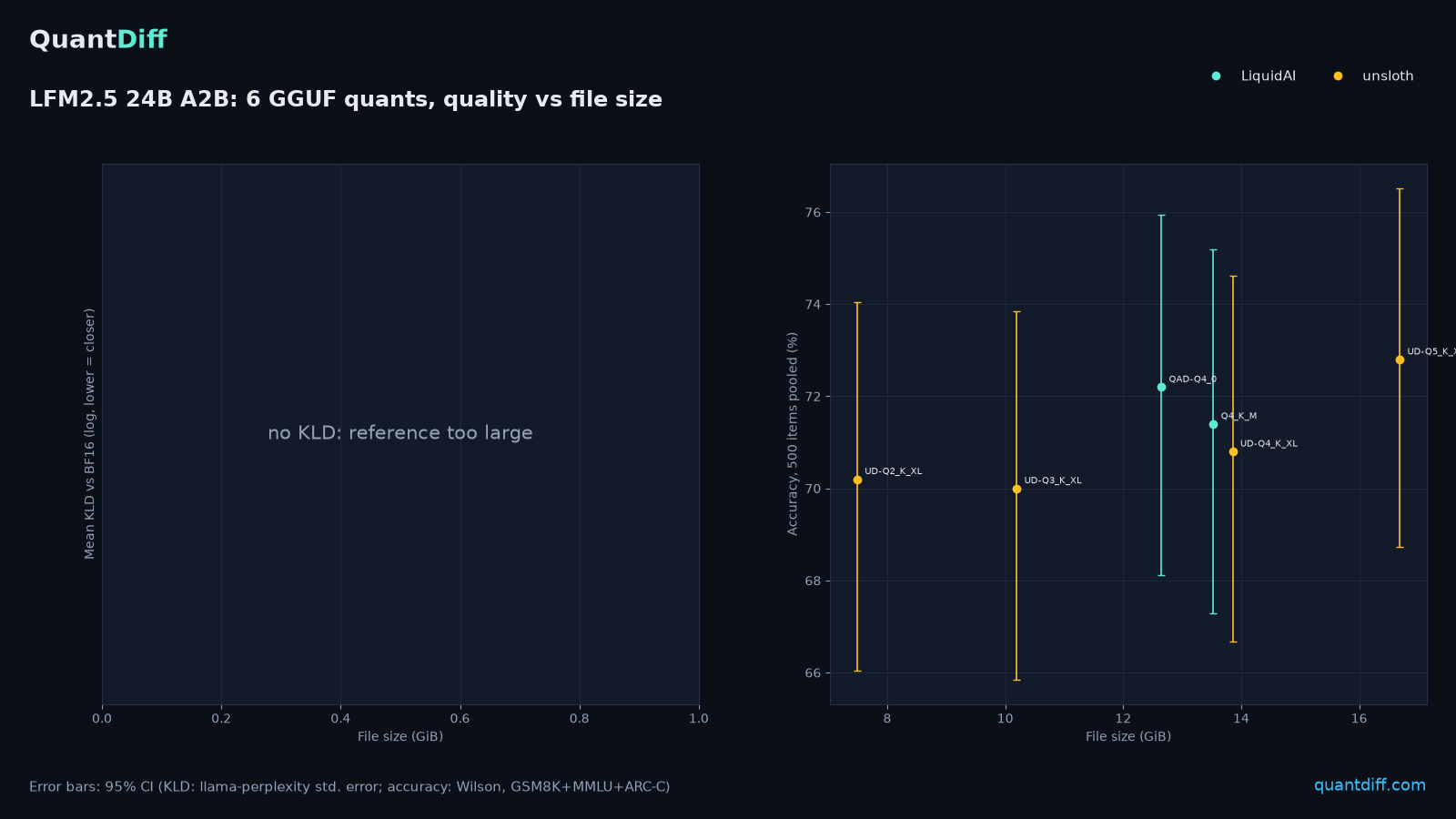
LFM2.5 24B A2B: accuracy vs file size
If a dot's bar reaches the shaded band, that file scores the same as the best one within the margin of error on our accuracy questions (GSM8K + MMLU + ARC-C); the smallest such file here is UD-Q2_K_XL at 7.49 GB.
- LiquidAI
- unsloth
- best file's 95% range
- clearly below the best
- our pick for 8 / 12 / 16 GB GPUs
Up: in %, bars = · Across: file size in GB (GiB) · = overlaps the band
Show the numbers (table)
| Quant | GB | Accuracy % | 95% interval | Correct | Tied with best | Pick |
|---|---|---|---|---|---|---|
| UD-Q2_K_XL | 7.49 | 70.2 | 66.0–74.0 | 351/500 | yes | 12 GB pick |
| UD-Q3_K_XL | 10.20 | 70.0 | 65.8–73.9 | 350/500 | yes | |
| QAD-Q4_0 | 12.65 | 72.2 | 68.1–75.9 | 361/500 | yes | 16 GB pick |
| Q4_K_M | 13.53 | 71.4 | 67.3–75.2 | 357/500 | yes | |
| UD-Q4_K_XL | 13.86 | 70.8 | 66.7–74.6 | 354/500 | yes | |
| UD-Q5_K_XL | 16.69 | 72.8 | 68.7–76.5 | 364/500 | yes | 24 GB pick |
LFM2.5 24B A2B: tool calls vs file size
If a dot's bar reaches the shaded band, that file scores the same as the best one within the margin of error on our tool-call tests; the smallest such file here is UD-Q2_K_XL at 7.49 GB.
- LiquidAI
- unsloth
- best file's 95% range
- clearly below the best
- our pick for 8 / 12 / 16 GB GPUs
Up: in %, bars = · Across: file size in GB (GiB) · = overlaps the band
Show the numbers (table)
| Quant | GB | Tool calls % | 95% interval | Correct | Tied with best | Pick |
|---|---|---|---|---|---|---|
| UD-Q2_K_XL | 7.49 | 82.0 | 76.1–86.7 | 164/200 | yes | 12 GB pick |
| UD-Q3_K_XL | 10.20 | 81.0 | 75.0–85.8 | 162/200 | yes | |
| QAD-Q4_0 | 12.65 | 84.0 | 78.3–88.4 | 168/200 | yes | 16 GB pick |
| Q4_K_M | 13.53 | 84.5 | 78.8–88.9 | 169/200 | yes | |
| UD-Q4_K_XL | 13.86 | 83.5 | 77.7–88.0 | 167/200 | yes | |
| UD-Q5_K_XL | 16.69 | 85.0 | 79.4–89.3 | 170/200 | yes | 24 GB pick |
LFM2.5 24B A2B: diff from the original (KLD)
No KLD for this model: The BF16 reference (about 48 GB) does not fit in our 32 GB test Mac (minipro), so there is no KLD for this model; we measured accuracy, tool calls and speed only.
LFM2.5 24B A2B: generation speed by quant and machine
Longer bar = faster replies. Smaller files are usually faster; the fastest measured here is QAD-Q4_0 (LiquidAI) at 89 tok/s on Apple M2 Pro 32GB (llama.cpp). Compare bars of the same colour only: each colour is a different machine.
- Apple M2 Pro 32GB (llama.cpp)
Across: (tokens per second)
Show the numbers (table)
| File | Publisher | GB | Machine | tok/s | Placement |
|---|---|---|---|---|---|
| UD-Q5_K_XL | unsloth | 16.69 | Apple M2 Pro 32GB (llama.cpp) | 62.8 | full GPU |
| QAD-Q4_0 | LiquidAI | 12.65 | Apple M2 Pro 32GB (llama.cpp) | 88.9 | full GPU |
| Q4_K_M | LiquidAI | 13.53 | Apple M2 Pro 32GB (llama.cpp) | 78.5 | full GPU |
| UD-Q4_K_XL | unsloth | 13.86 | Apple M2 Pro 32GB (llama.cpp) | 69.1 | full GPU |
| UD-Q3_K_XL | unsloth | 10.20 | Apple M2 Pro 32GB (llama.cpp) | 68.8 | full GPU |
| UD-Q2_K_XL | unsloth | 7.49 | Apple M2 Pro 32GB (llama.cpp) | 73.8 | full GPU |
Not sure which fits? Use the quant picker →
Recommendation by VRAM
"Best" = highest measured accuracy (500 items pooled) among files that fit fully on the GPU (file + 8192-token KV cache), tool-call score as tie-breaker. No KLD for this model (reference too large).
8GB GPU
Nothing we've tested fits fully in 8GB at 8192 context. Try a smaller model, run it GPU+RAM split, or rent a bigger GPU.
12GB GPU
- File size
- 7.49 GB
- no KLD: reference too large
- Accuracy (500 items)
- 70.2% (66.0–74.0)
- 82.0%
- Accuracy
- Generation ()
- 74 t/s on Apple M2 Pro 32GB full GPU
How to run this file
From unsloth/LFM2.5-24B-A2B-GGUF, file LFM2.5-24B-A2B-UD-Q2_K_XL.gguf.
(downloads it, then starts a chat; type /bye to quit):
ollama run hf.co/unsloth/LFM2.5-24B-A2B-GGUF:LFM2.5-24B-A2B-UD-Q2_K_XL.gguf: open the Discover tab, search unsloth/LFM2.5-24B-A2B-GGUF, pick the UD-Q2_K_XL download, then load it from the Chat tab.
16GB GPU
- File size
- 12.65 GB
- no KLD: reference too large
- Accuracy (500 items)
- 72.2% (68.1–75.9)
- 84.0%
- Accuracy
- Generation ()
- 89 t/s on Apple M2 Pro 32GB full GPU
How to run this file
From LiquidAI/LFM2.5-24B-A2B-GGUF, file LFM2.5-24B-A2B-QAD-Q4_0.gguf.
(downloads it, then starts a chat; type /bye to quit):
ollama run hf.co/LiquidAI/LFM2.5-24B-A2B-GGUF:LFM2.5-24B-A2B-QAD-Q4_0.gguf: open the Discover tab, search LiquidAI/LFM2.5-24B-A2B-GGUF, pick the QAD-Q4_0 download, then load it from the Chat tab.
All LFM2.5 24B A2B quants
| Quant | Publisher | Size | Fits | mean | Gen | Run | ||
|---|---|---|---|---|---|---|---|---|
| UD-Q2_K_XL | unsloth imatrix | 7.49 GB | 12GB+ | n/a | — | 82.0% | 74 Apple M2 Pro 32GB | settings & logs |
| UD-Q3_K_XL | unsloth imatrix | 10.20 GB | 12GB+ | n/a | — | 81.0% | 69 Apple M2 Pro 32GB | settings & logs |
| QAD-Q4_0 | LiquidAI | 12.65 GB | 16GB+ | n/a | — | 84.0% | 89 Apple M2 Pro 32GB | settings & logs |
| Q4_K_M | LiquidAI | 13.53 GB | 16GB+ | n/a | — | 84.5% | 78 Apple M2 Pro 32GB | settings & logs |
| UD-Q4_K_XL | unsloth imatrix | 13.86 GB | 16GB+ | n/a | — | 83.5% | 69 Apple M2 Pro 32GB | settings & logs |
| UD-Q5_K_XL | unsloth imatrix | 16.69 GB | 24GB+ | n/a | — | 85.0% | 63 Apple M2 Pro 32GB | settings & logs |
Accuracy cells: % correct, with the 95% confidence interval (Wilson) underneath. ≈ = statistically tied with the best quant of the same model (intervals overlap). ▼ below = clearly worse than that model's best quant (intervals do not overlap). Ties are not ranked: sorting by an accuracy column puts tied quants together and orders them by KLD. How accuracy is measured.
GB = GiB (1024³ bytes). Measured on: tool calls: minipro (Apple M2 Pro 32GB); speed: minipro (Apple M2 Pro 32GB); accuracy: minipro (Metal, Apple M2 Pro (Mac mini), 32 GB unified memory). On a different GPU, expect generation speed to scale roughly with memory bandwidth. Task accuracy (GSM8K / MMLU / ARC-C, % correct on fixed subsets of 150 / 200 / 150 items, frozen suite quantdiff-lmeval-v1) was measured with the same GGUF files and llama.cpp build on Ghost (CUDA, NVIDIA GeForce RTX 5070 12 GB (64 GB RAM)), minipro (Metal, Apple M2 Pro (Mac mini), 12-core CPU, 19-core GPU, 32 GB unified memory), minipro (Metal, Apple M2 Pro (Mac mini), 32 GB unified memory). Accuracy depends on the weights, not on the GPU, but small numeric differences between backends can flip individual answers. With these sample sizes, differences under about 5 points are within noise (± shown on run pages). Methodology.
GPU too small? Rent one.
Run a 32B model at Q6/Q8, or a 70B, on a cloud GPU for an hour or two instead of buying hardware.
Cloud GPU pods with 24-80GB cards (RTX 4090 / 5090 / A100 / H100) for big quants or BF16 reference runs.
Rent on RunPodGPU marketplace for renting a 24-48GB card for an evening of testing.
Rent on Vast.aiReferral links: QuantDiff may earn credit if you sign up. Referral partners have no say in scores or rankings.